


 |
 |
 |
|
|


| Enlaces Rápidos |
|---|
Cisco SPA525G
The Cisco SPA525G 5-Line IP Phone with Color Display is an excellent choice for businesses that require an enhanced user experience with a hosted IP telephony service, an IP private branch exchange (PBX), or a large-scale IP Centrex deployment. The SPA525G uses industry-leading SPA voice over IP (VoIP) technology from Cisco, with high-quality hardware providing additional connectivity via Bluetooth for headset connectivity, Power over Ethernet (PoE) (802.3af), or a Wireless-G client (802.11g).
Standard features on the Cisco SPA525G include five active lines, VLAN-capable dual switched Ethernet ports, 802.3af PoE support, a 3.2-inch QVGA color display, a full-duplex, high-quality speakerphone, a Bluetooth interface for headset connectivity, a Wireless-G (802.11g) client, a 2.5-mm stereo headset port, and a USB 2.0 host port. Each line can be configured independently to use a unique phone number (or extension) or can use a shared number that is assigned to multiple phones. The optional SPA500S 32-Button Attendant Console adds up to 64 buttons for receptionist applications.
The Cisco SPA525G IP Phone continues to improve the user experience with VPN and video surveillance applications. The SPA525G comes with an embedded VPN client that allows remote users to securely connect to their phone system and make calls over the Internet, without the need of additional hardware. The SPA525G IP Phone also provides users the ability to view video feeds from Cisco PVC2300 video surveillance cameras, allowing users to quickly see different locations around the business in order to improve physical security.
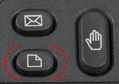
STEP 1 To do this, press the Paper "button" followed by the number 9. Thiswill take you into the network settings. Option 2 on the display will show you the phone's current IP address.
|
STEP 2
Go to any browser equipped computer on your network and enter the address: http://<IP ADDRESS>/
(where <IP ADDRESS> is replaced by the address that was given to you in STEP 1).
STEP 3 |
|
|
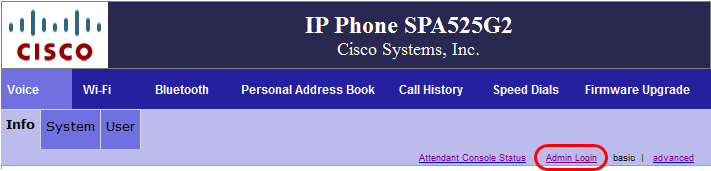

STEP 4 |
|
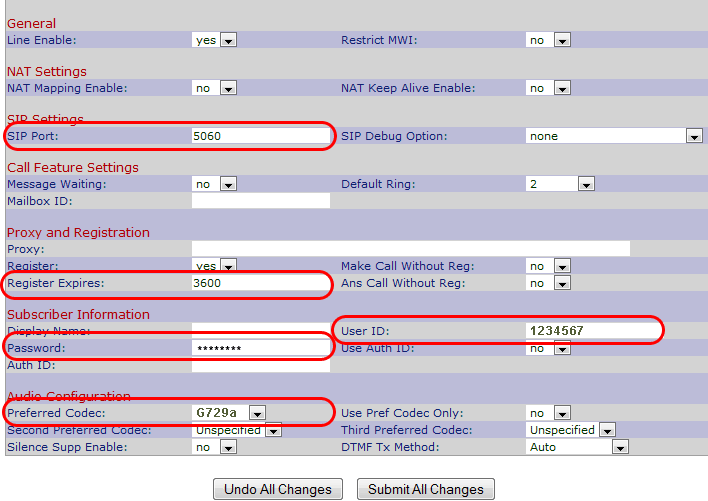
| SIP Port: | 5060 |
| Proxy: | sip.inphonex.com |
| Register Expires: | 3600 |
| User ID: | Enter the phone number you chose when you signed up for InPhonex service. |
| Password: | Enter the password that you chose when you signed up for InPhonex service. |
| Preferred Codec: | G729a |
|
|
STEP 5
If the second extension is needed, click on Ext2 and repeat Step 4. Please make sure to increment the SIP port by one. For example, Ext1 SIP port: 5060; Ext2 SIP port: 5061.
STEP 6
Make calls!
|
||
VarPhonex ofrece el Programa VoIP de Revendedor que es el líder en el mercado. Le permitimos vender VoIP con su propia marca, incluyendo servicio telefónico IP, terminales SIP, SIP Trunking, números DID internacionales y planes VoIP ilimitados. También ofrecemos servicio telefónico prepago usando nuestro sistema de voz sobre IP y un adaptador telefónico análogo, softphone, PBX, Asterisk, Trixbox u otro dispositivo VoIP que pueda usar un Trunk SIP. Las soluciones de marca privada de VarPhonex están diseñadas para que usted pueda ofrecer nuestro servicio telefónico residencial, para empresas, call centres y cyber cafés. VarPhonex se enorgullece se brindar soporte a equipos de telefonía IP incluyendo Supura, Linksys, Cisco, Digium, Grandstream y mucho más. Ofrecemos tarifas A – Z de bajo costo y brindamos terminales VoIP con números telefónicos DID para reventa privada. |
||
| Sobre Nosotros | Servicios | Soporte | Login de Revendedor | Consulte Precios | Teléfonos IP y Dispositivos | RingByName Teléfono Gratuito | Dispositivos para Telefonía IP | Planes de Llamadas | Telefonía Web | Crédito Pague-Cuando-Llame |